
10 steps · 4 parts · 2 roles
How a parent's review reaches your website
A centre decides what can be reviewed, a parent writes one, a moderator checks it for a child's name before a word of it is published, and only then does it appear. Four switches, all of them visible.
Everything below is the real product, photographed automatically. The school, its staff and its pupils are invented for this walkthrough — no real family appears on this page.
Deciding what can be reviewed
Steps 1–2Org Admin- penleap.com/dashboard/reviews/itemsSigned in as Org Admin
1Two switches per thing, because they are two different decisions 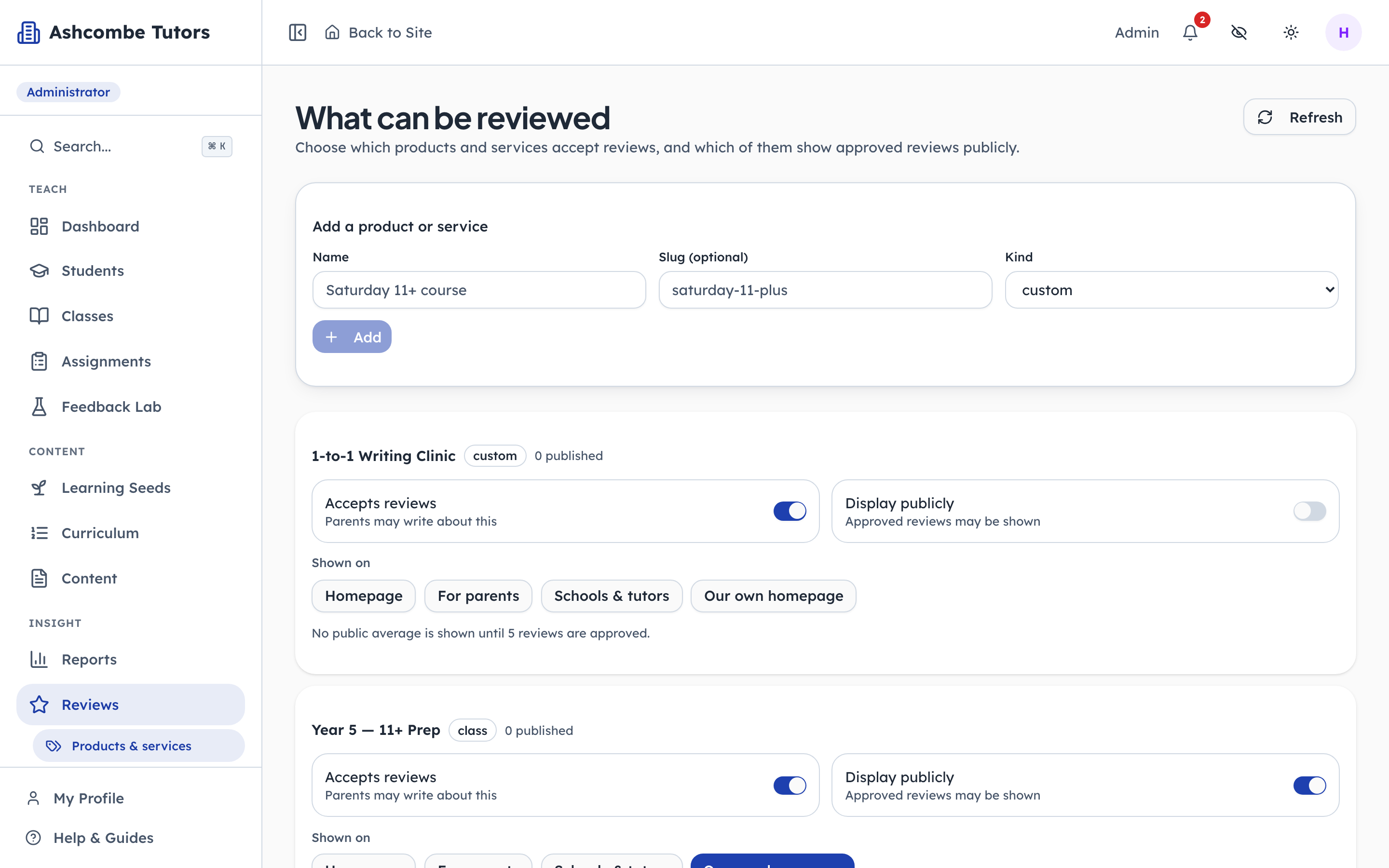
- 1Notice: Parents may write about this
- 2Notice: …but nothing is shown yet
- 3Type in: Add a course or a service
Accepts reviews asks whether parents may write about this at all. Display publicly asks whether the approved ones may be shown. They are deliberately separate: a centre that wants honest feedback on a new one-to-one service is not necessarily ready to advertise it. The clinic below is exactly that case — open for comment, closed for publication.
- penleap.com/dashboard/reviews/itemsSigned in as Org Admin
2And where each one is allowed to appear 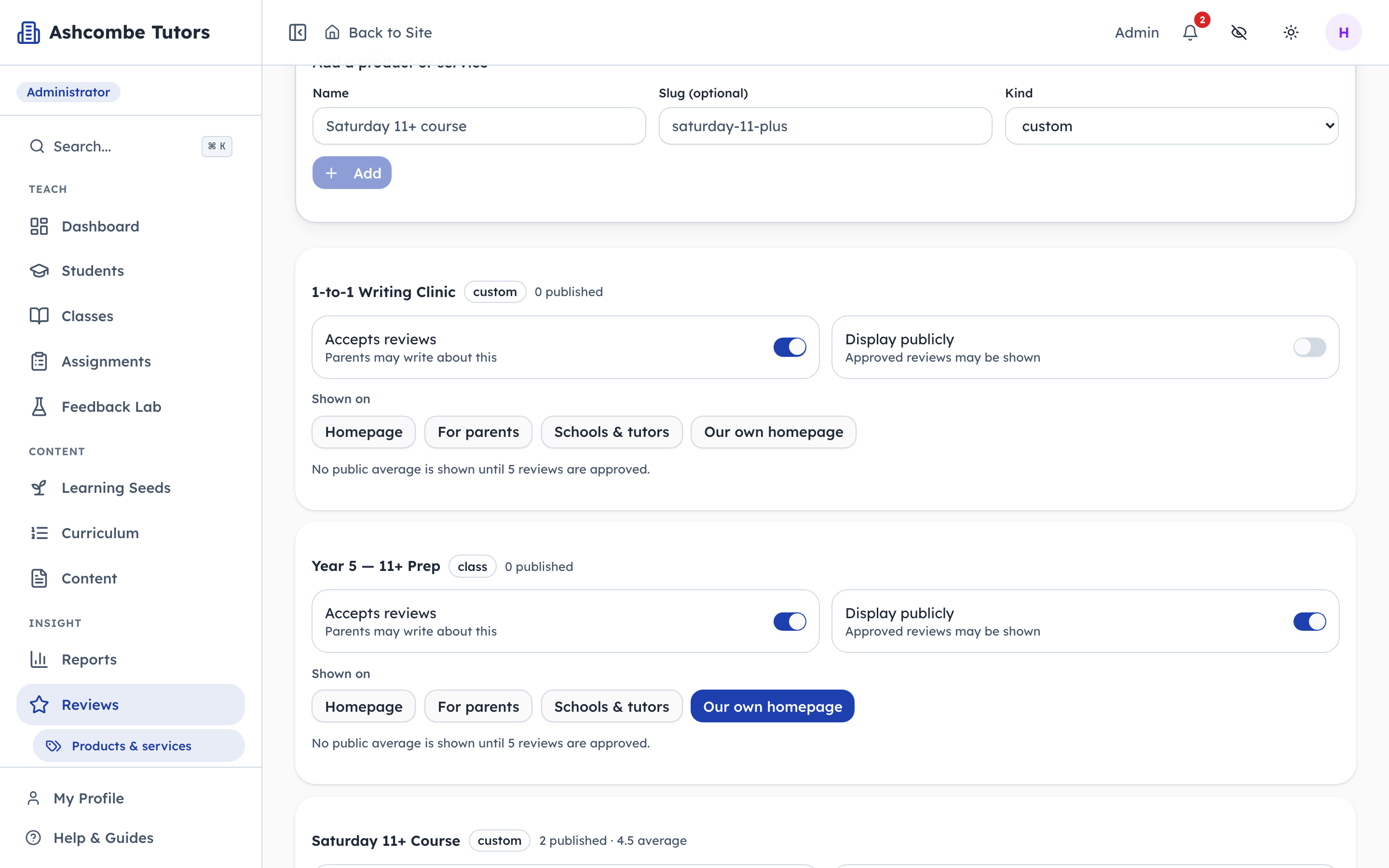
- 1Notice: Which pages may show it
- 2Notice: No average until it means something
An approved review does not go everywhere. Each item names the pages it may show on, so a class can carry reviews on your own homepage without them turning up on PenLeap's. The line underneath is the honesty gate: no public average appears until there are enough reviews for an average to mean anything. Four five-star reviews showing "5.0" is the misleading number this rule exists to prevent.
A parent writes one
Steps 3–4Parent- penleap.com/parent/reviewsSigned in as Parent
3Only the things this family actually uses are offered 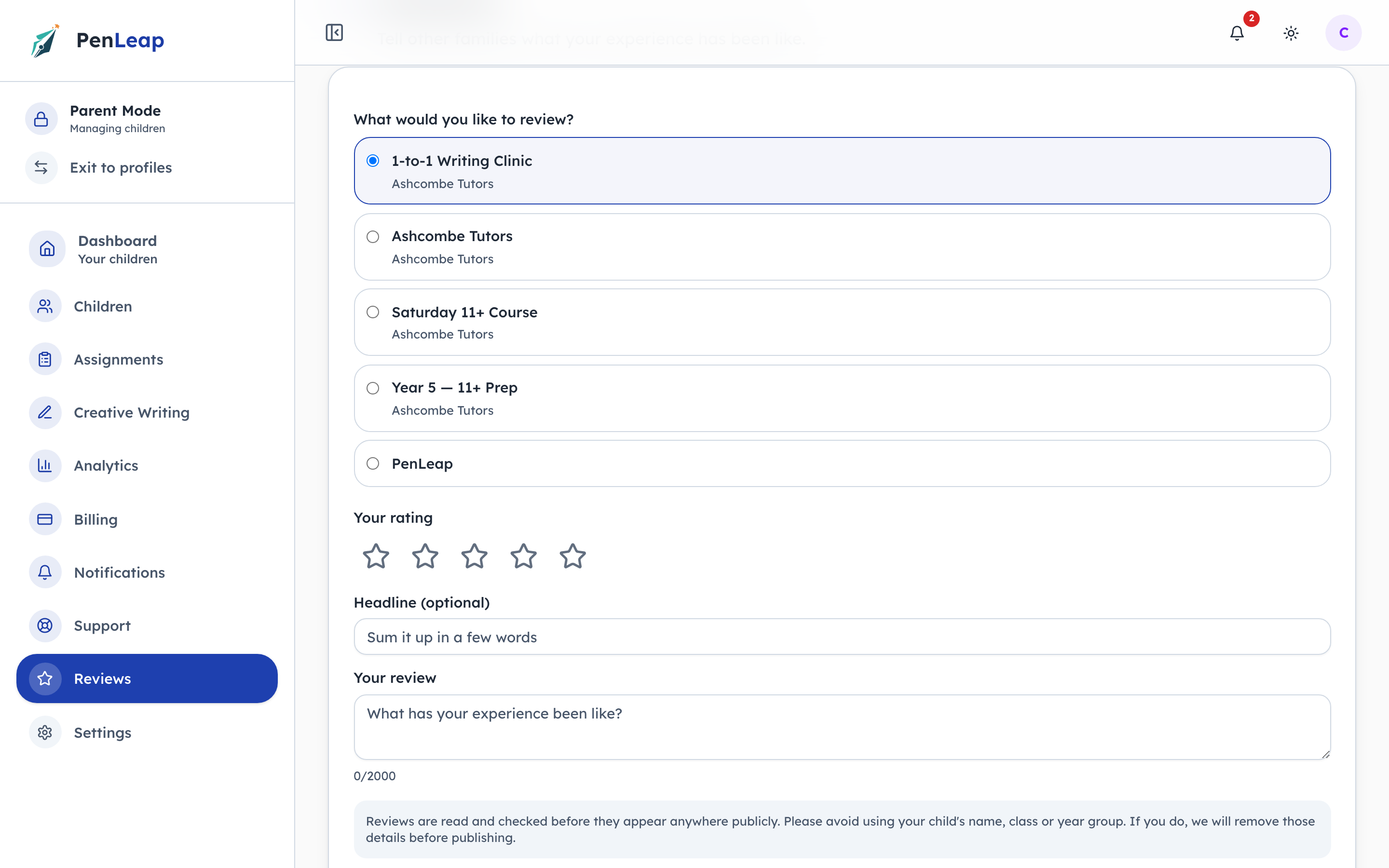
- 1Click: What are you reviewing?
- 2Click: A rating out of five
- 3Type in: In your own words
A parent is not shown a list of everything the centre sells. The choices here are the ones this family is enrolled in, which is what makes the review a verified one rather than an opinion from a stranger. The centre itself, the Saturday course and the group their child is in are three separate things, and a parent may feel differently about each.
- penleap.com/parent/reviewsSigned in as Parent
4The warning a parent sees before they type their child's name 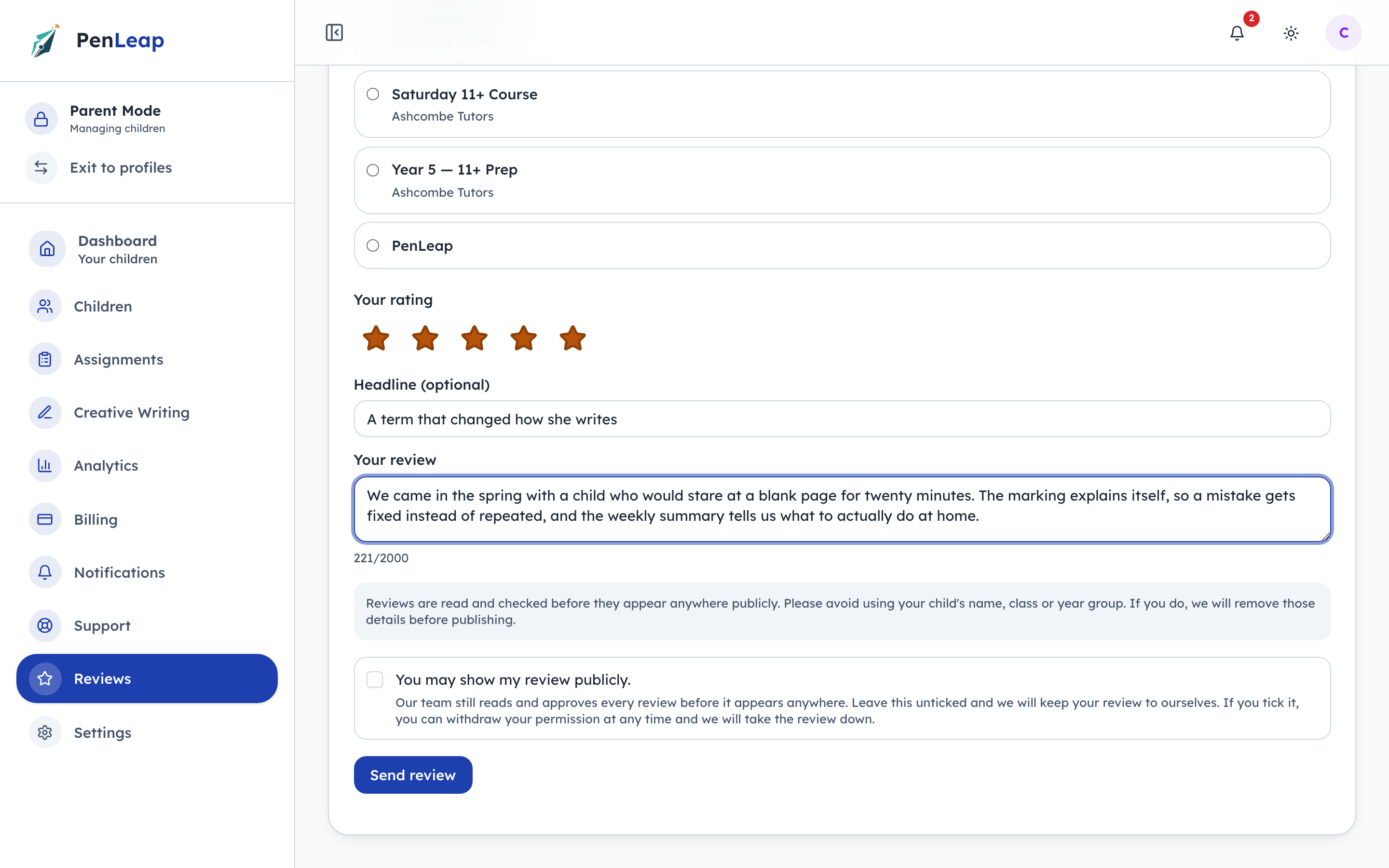
- 1Notice: Asked, before it is scanned
- 2Click: Consent — and it can be withdrawn
- 3Click: Nothing is public yet
This paragraph is the cheapest safeguarding control in the product: most parents, asked plainly, simply do not write the name. It is not relied on — the scan in the next act catches the ones who do — but a warning before the fact removes far more risk than a redaction after it. Consent is separate again, and withdrawable: a review written today can be taken down by its author next year.
A moderator reads it first
Steps 5–8Org Admin- penleap.com/dashboard/reviewsSigned in as Org Admin
5Nothing a parent writes appears publicly until it is approved here 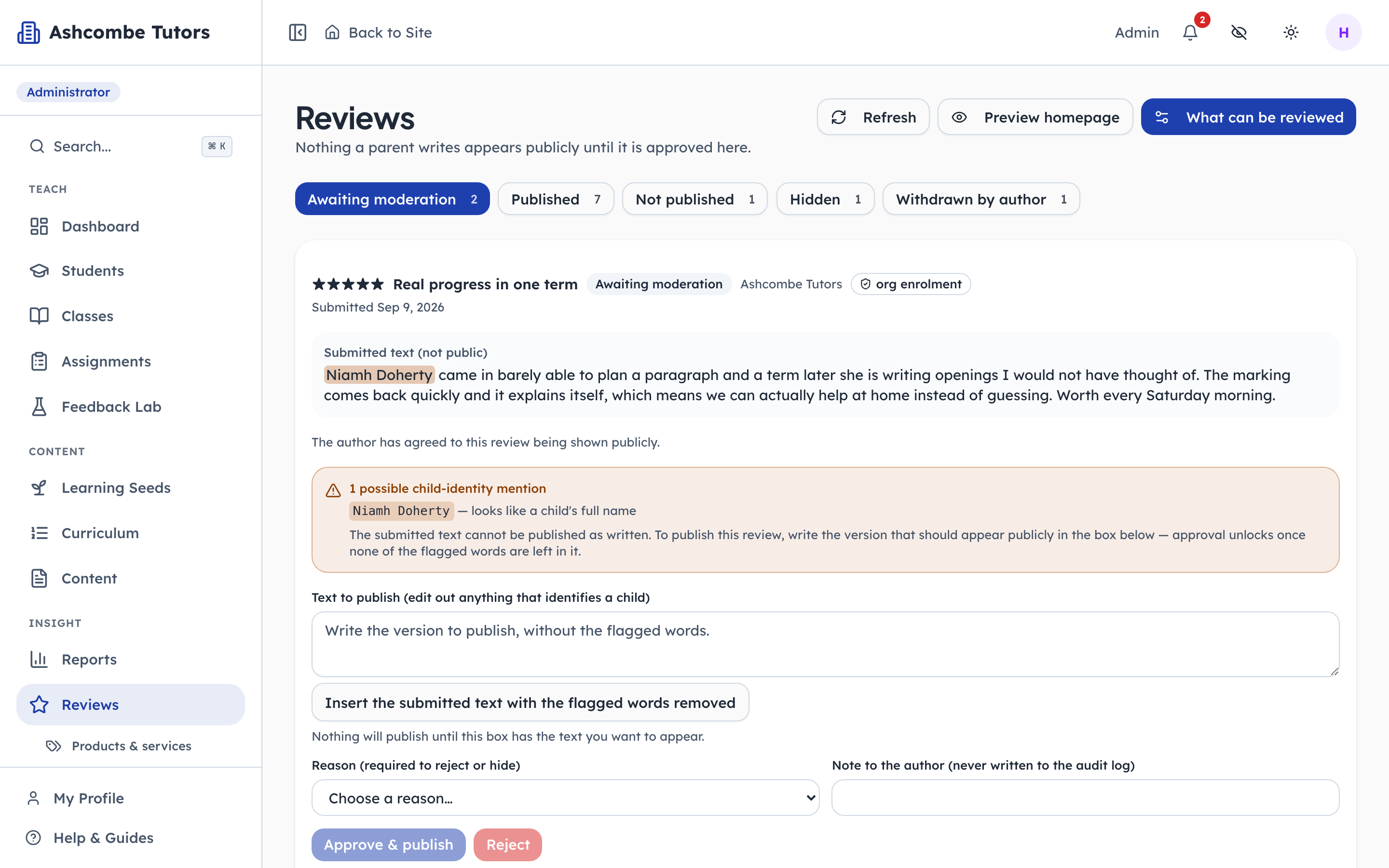
- 1Notice: Needs a person today
- 2Notice: Live now
- 3Notice: Taken back by the family
One tab per state, and the counts are the whole job description. Awaiting moderation is the only one that needs a person today. The other four are the record: what was published, what was refused, what was taken down afterwards, and what the author withdrew themselves.
- penleap.com/dashboard/reviewsSigned in as Org Admin
6The review names a child — so it cannot be published as written 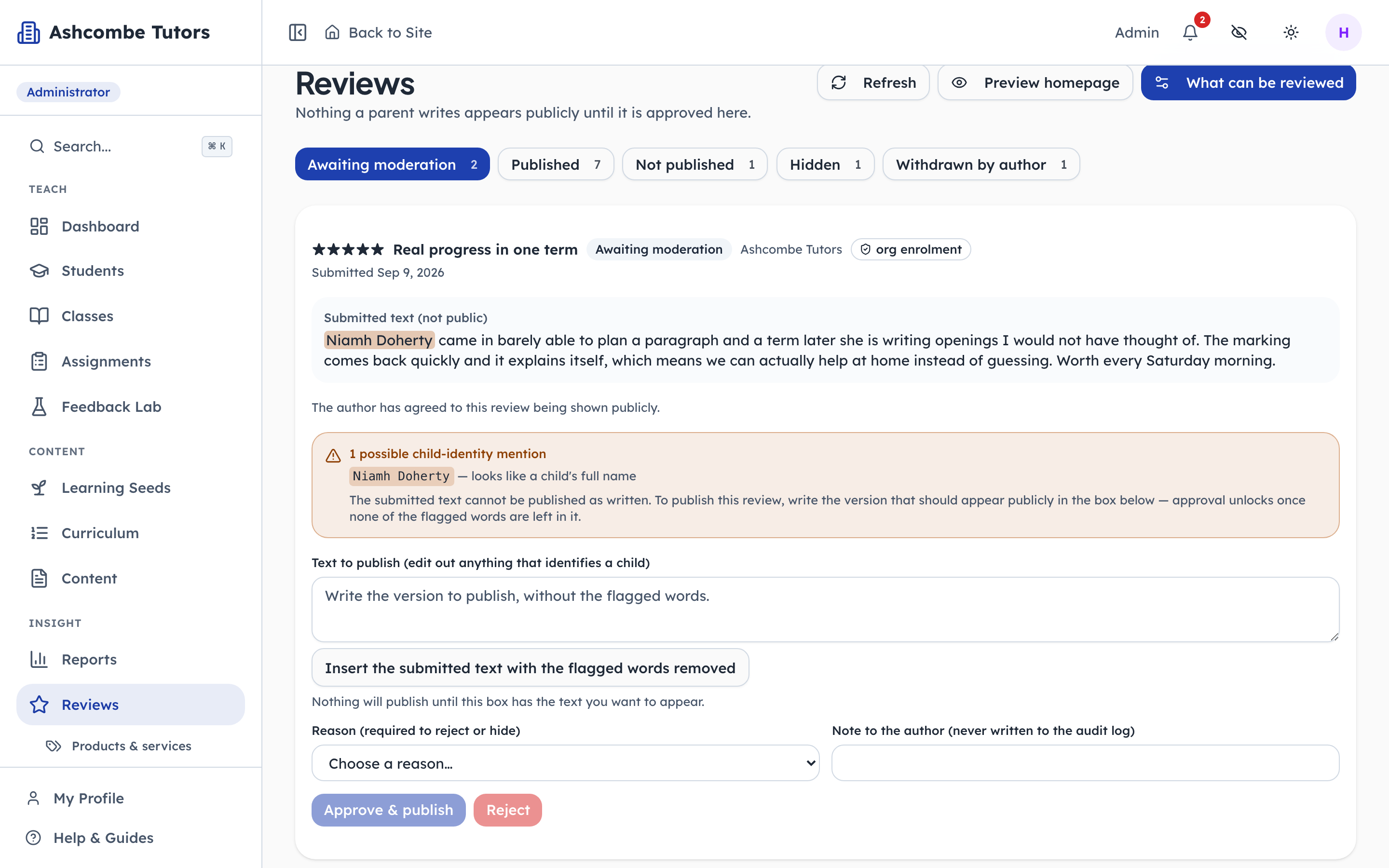
- 1Notice: The parent's words — never public
- 2Notice: A child's name was found
- 3Notice: Exactly which words
The scan reads the raw text and finds the name. Note what it does NOT do: it does not reject the review, and it does not quietly edit it. It refuses to publish this text, says why, and hands the decision to a person. The submitted words are marked "not public" because they never will be; only the version written in the box below can be.
- penleap.com/dashboard/reviewsSigned in as Org Admin
7The moderator writes the version that goes out 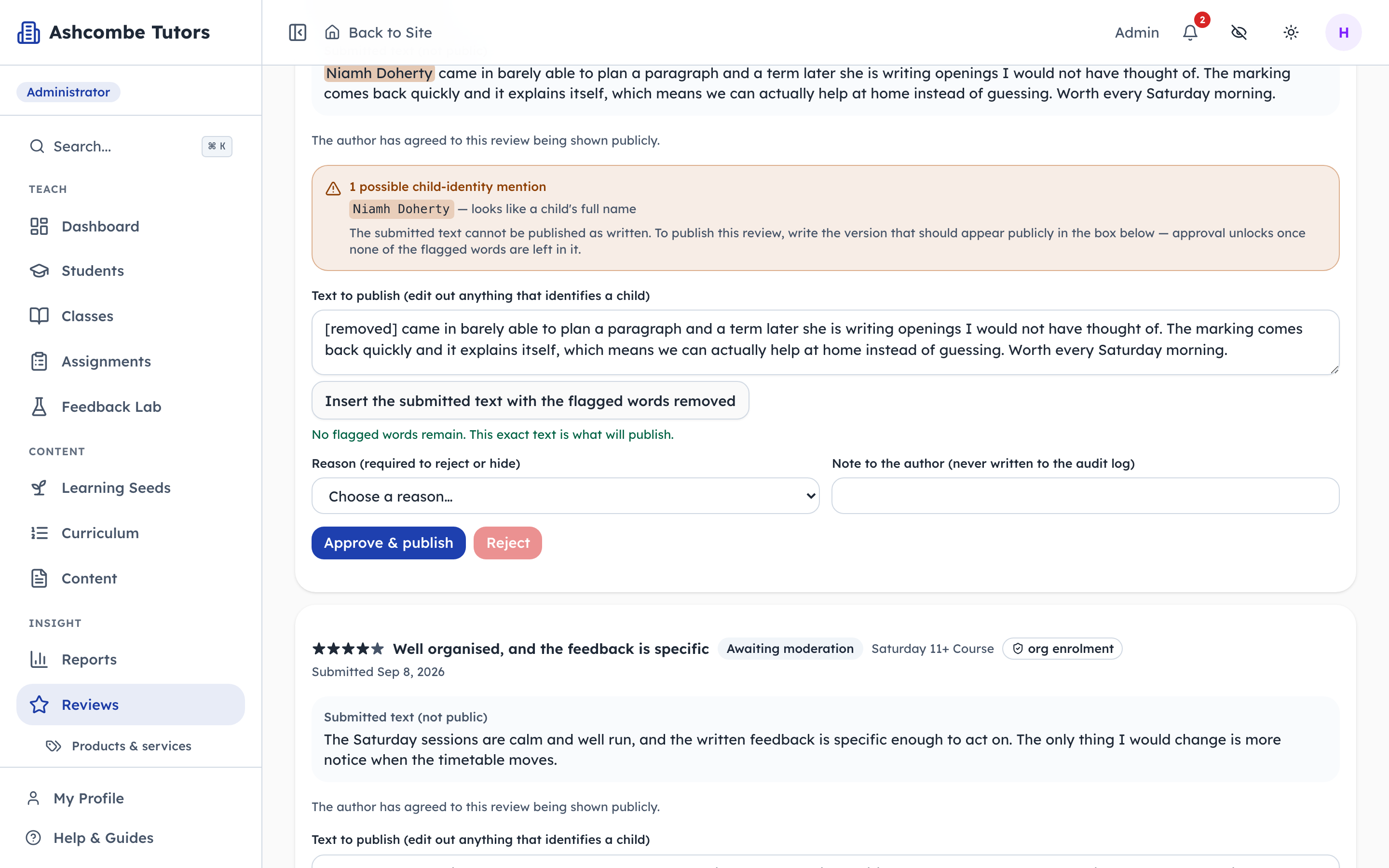
- 1Click: Strip the flagged words
- 2Type in: This, and only this, publishes
- 3Click: Unlocked once the box is clean
One button removes the flagged words and leaves the rest, which is almost always the right edit and takes a second. The moderator can then say it better if they want to. Approve stays locked until nothing flagged is left in the box — the check is on the text being published, not on the text that was submitted, which is the only way round that actually holds.
- penleap.com/dashboard/reviewsSigned in as Org Admin
8Refusing takes a reason, and the reasons are a fixed list 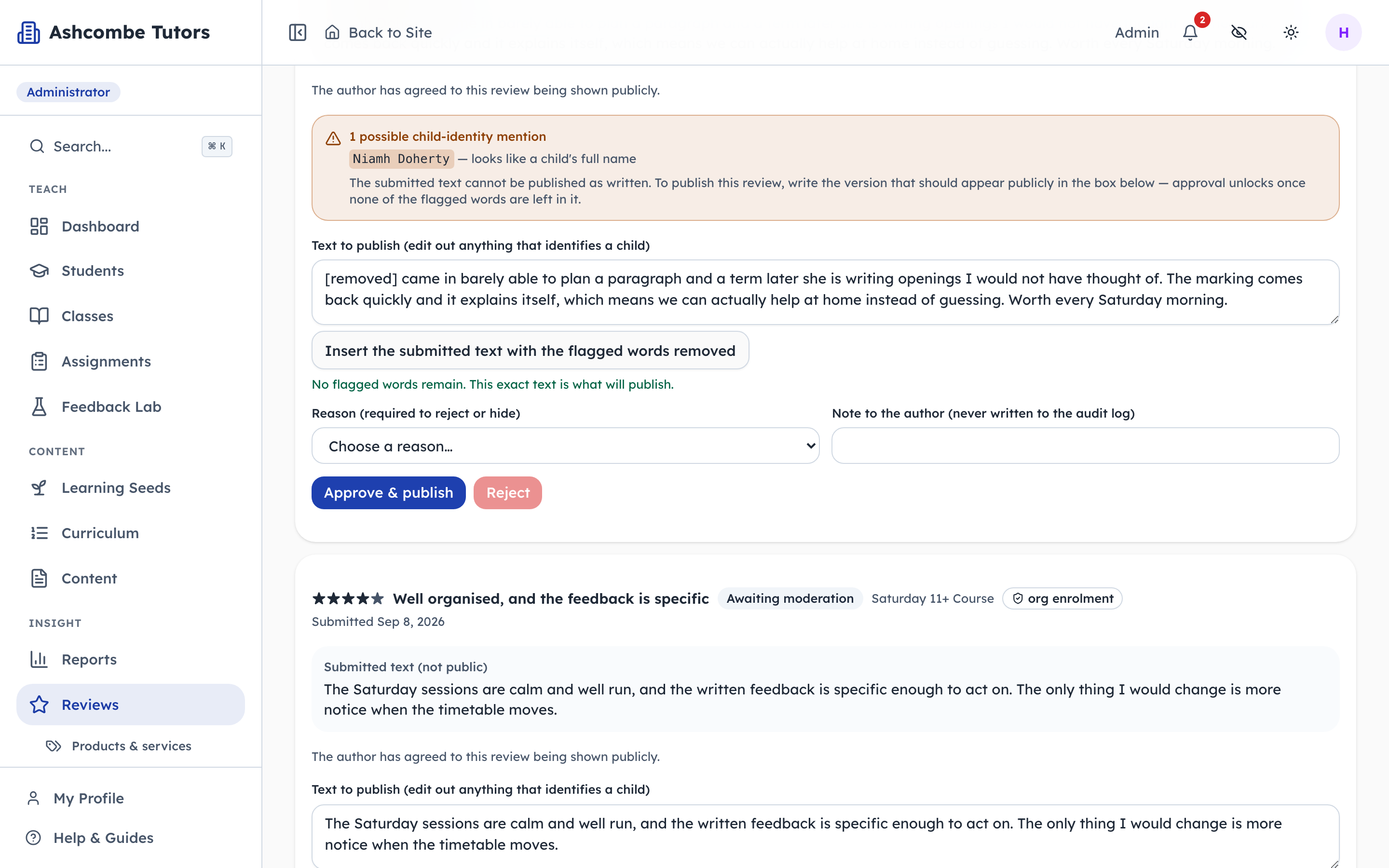
- 1Click: A fixed list, not free text
- 2Notice: Never written to the log
A moderator cannot type free text into the record. The reason codes are a closed set — off topic, identifies a child, not a verified experience — so a year of decisions can be counted and questioned. The note beside it is for the author and is deliberately kept out of the audit log, because a moderator explaining themselves might well type the very name they just removed.
- penleap.com/dashboard/reviewsSigned in as Org Admin
V1What has already been published, and what was taken down 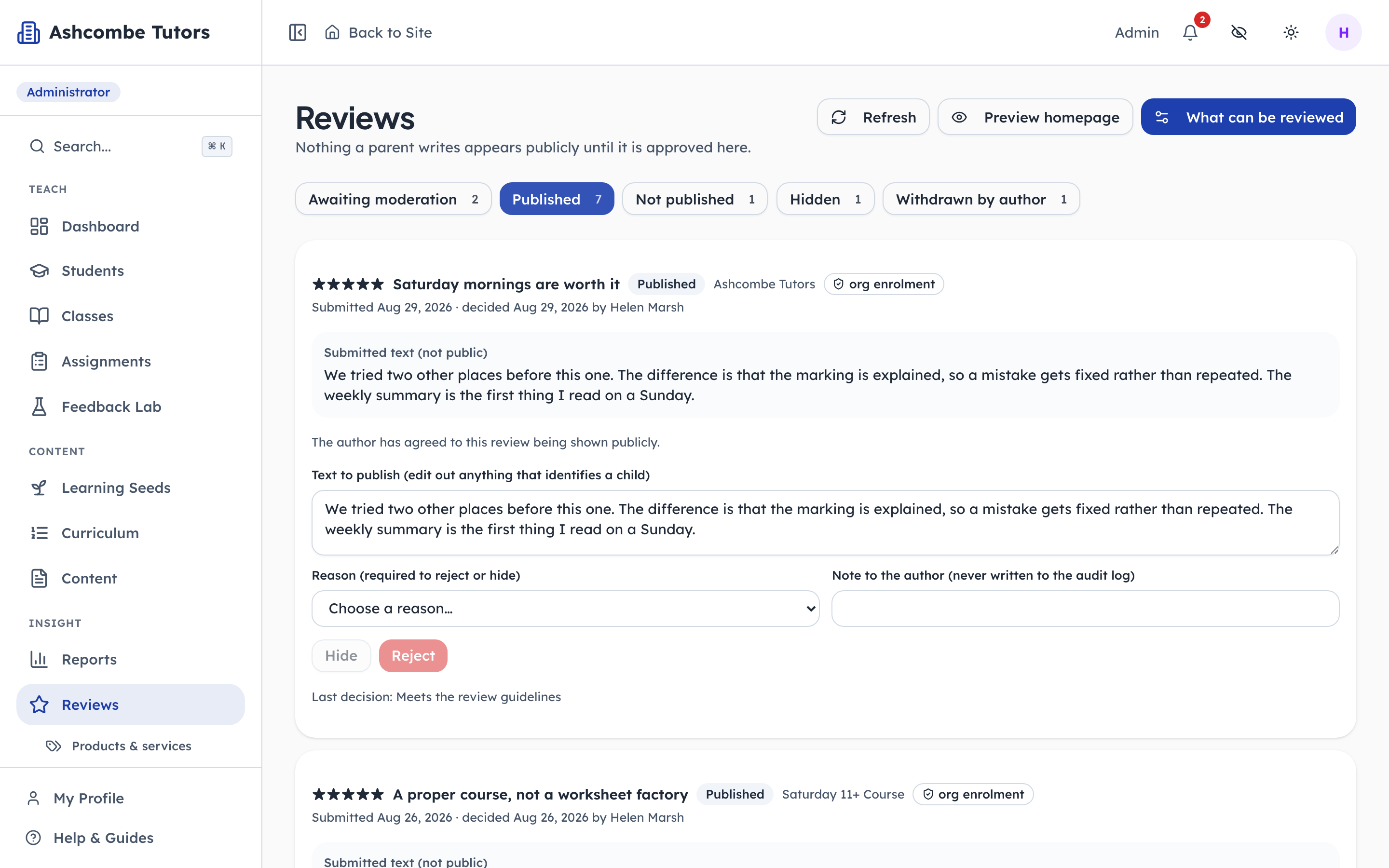
- 1Notice: Live on the site now
Approving is reversible. A review that turns out to identify someone can be hidden afterwards, and an author can withdraw their own consent at any time — which is what makes it consent rather than a form field. Both actions clear the published text in the same write, so there is no window in which it is still readable.
What the public actually sees
Steps 9–10Org Admin- penleap.com/dashboard/reviews/previewSigned in as Org Admin
9The real band, from the real reader — not a mock-up of one 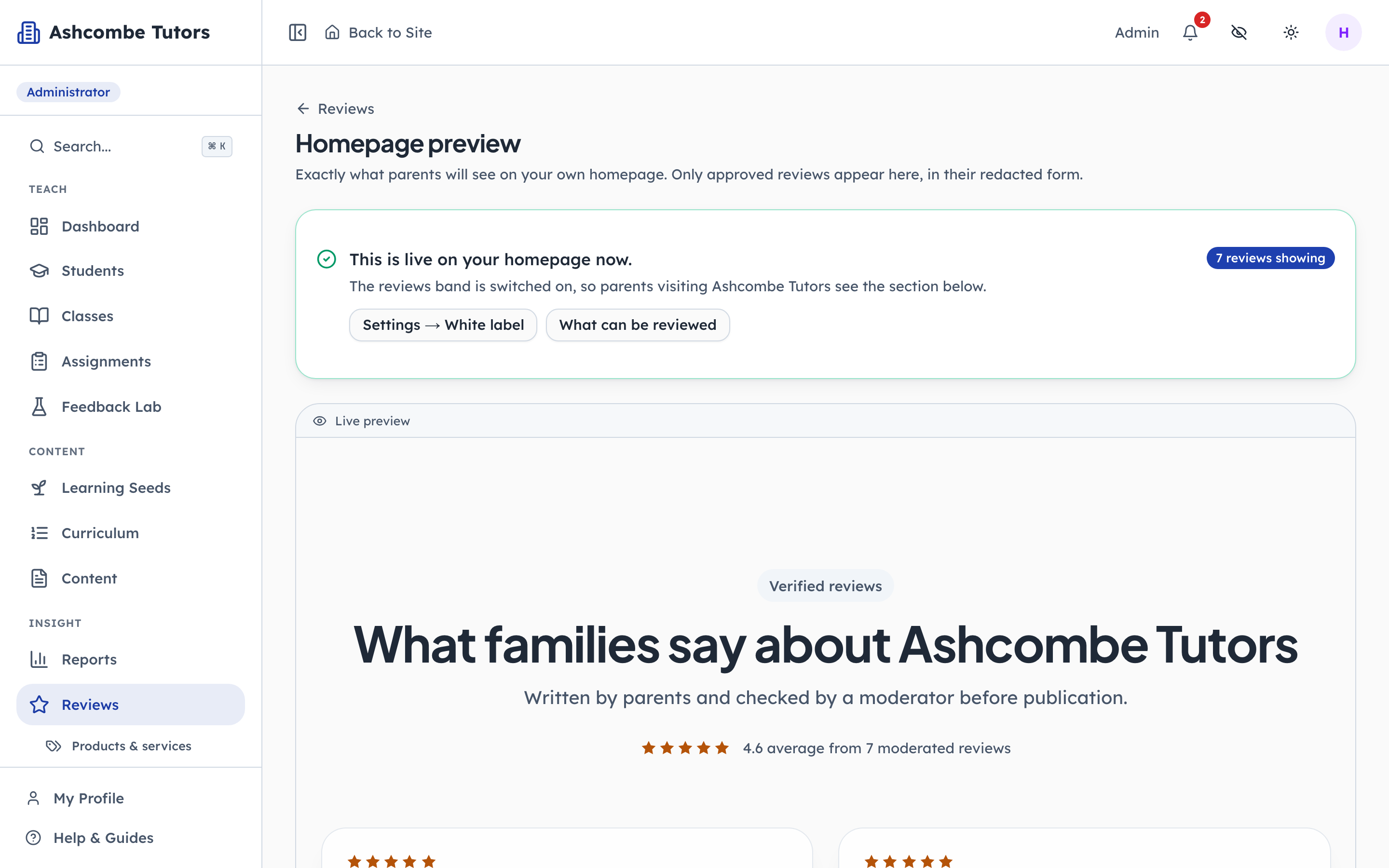
- 1Notice: On, or off, and why
- 2Notice: How many made it through
- 3Notice: The real band, not a mock-up
This screen renders the same component the homepage renders, from the same reader, with the same copy and the same rules. So the redacted text is what appears here, and an average only shows once the sample size is met. The banner at the top answers the question this page exists for: is it actually on, and if not, which of the four switches is still off?
- penleap.com/dashboard/reviews/previewSigned in as Org Admin
10Redacted text, a verified badge, and an average that is allowed 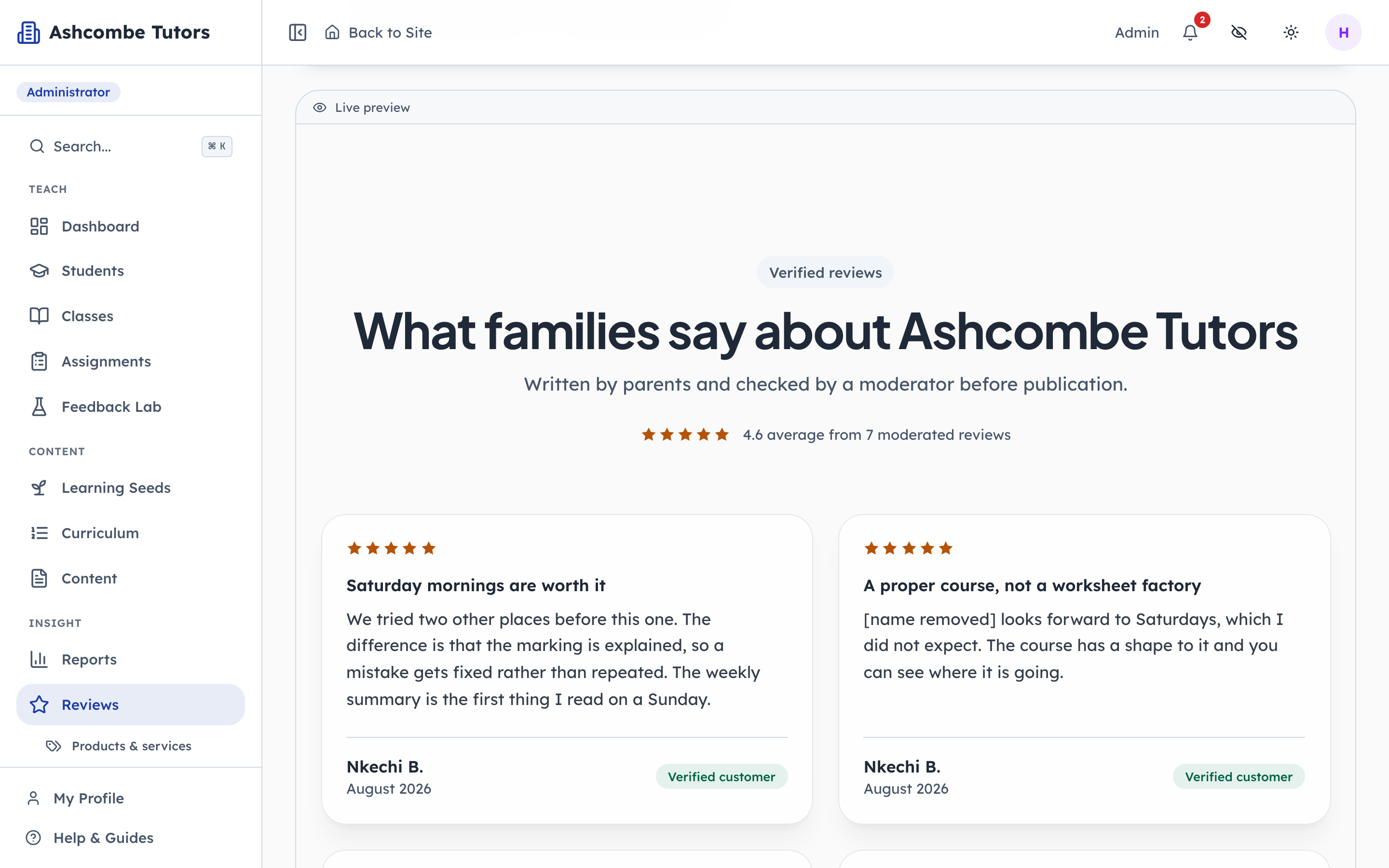
- 1Notice: Only shown once it is honest
This is what a family visiting Ashcombe Tutors would read. The review that named a child appears with the name gone, because the published copy is a different field from the submitted one and only the published copy is ever served. Nothing here was written by the centre.